
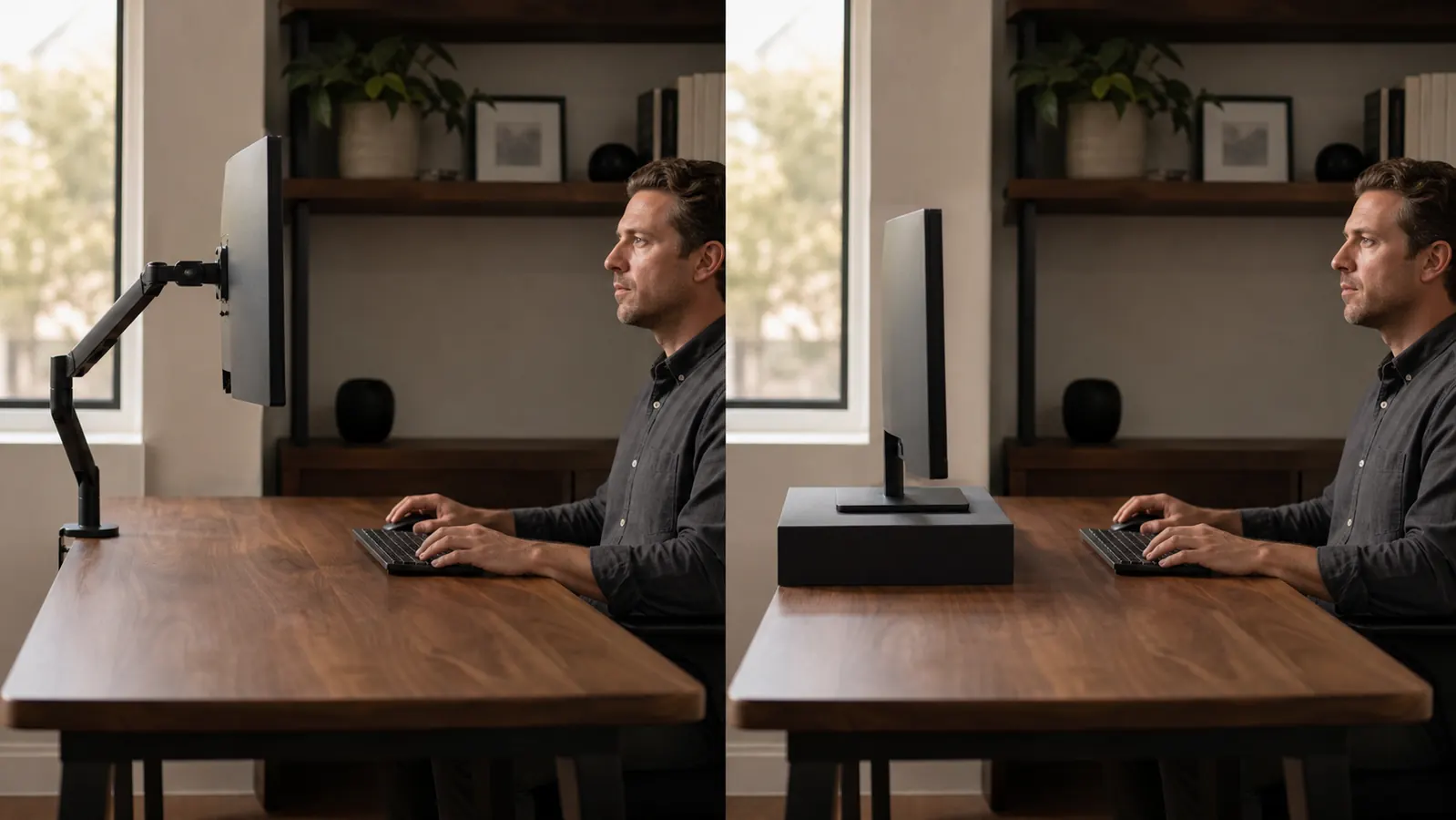
I ran a basic fixed monitor stand for almost two years before I bothered to ask why my neck was sore by 3pm most days. It wasn't the chair. It wasn't the desk height. It was that the stand set my 27 inch monitor about two and a half inches too low, so I spent eight hours a day tipping my chin down to read the screen. I replaced it with the VIVO Single 13 to 38 inch Monitor Arm, a budget gas-spring desk mount, and the difference showed up faster than I expected, within about four days my neck stiffness dropped from a daily 4pm complaint to something I barely notice most weeks.
The short answer, if your monitor sits too low or too high and you can't fix that with books or a shelf, the arm wins, it's not close. If your monitor already sits at a good height on a stand you already own and you just want it to stop wobbling, a fixed stand does that job fine for a lot less money. At Best Home Office Setup Hub we get asked which one actually fixes neck pain more than any other monitor question, and the honest answer depends on whether your real problem is height or just stability. Most people asking this question have a height problem, not a stability problem, which is why the arm tends to be the better buy.
| VIVO Monitor Arm | Fixed Monitor Stand | |
|---|---|---|
| Price (typical retail) | Check today's price on Amazon | Check today's price on Amazon |
| Height Adjustability | Full gas-spring vertical travel, roughly 15.7 inches of range, holds position anywhere in that range | Fixed height, some models offer 2 to 3 preset slots you set once and leave |
| Tilt, Swivel, Rotate | Full articulation, tilt from negative 85 to positive 15 degrees, 180 degree swivel, 360 degree rotation for portrait mode | Little to no movement, most only allow a slight forward tilt |
| Desk Footprint | Clamps to the back edge, frees the entire desk surface underneath the monitor | Sits directly on the desktop, takes up roughly 4 to 8 inches of usable desk depth |
| Mounting Method | C-clamp or through-desk grommet, tool included | Freestanding, no mounting hardware needed |
| Weight Capacity | Up to 22 lbs, fits regular screens up to 32 inches and ultrawides up to 38 inches | Usually rated for a single monitor under 24 inches, varies a lot by model |
| Cable Management | Built-in clip channels run cables up through the arm out of sight | None, cables hang loose off the back of the desk |
| Assembly Time | About 15 to 20 minutes, one person, included tools | Under 5 minutes, unbox and set the monitor on top |
| Warranty | 3-year limited | Usually none, or a 90-day return window at most |
Where the VIVO Arm Wins
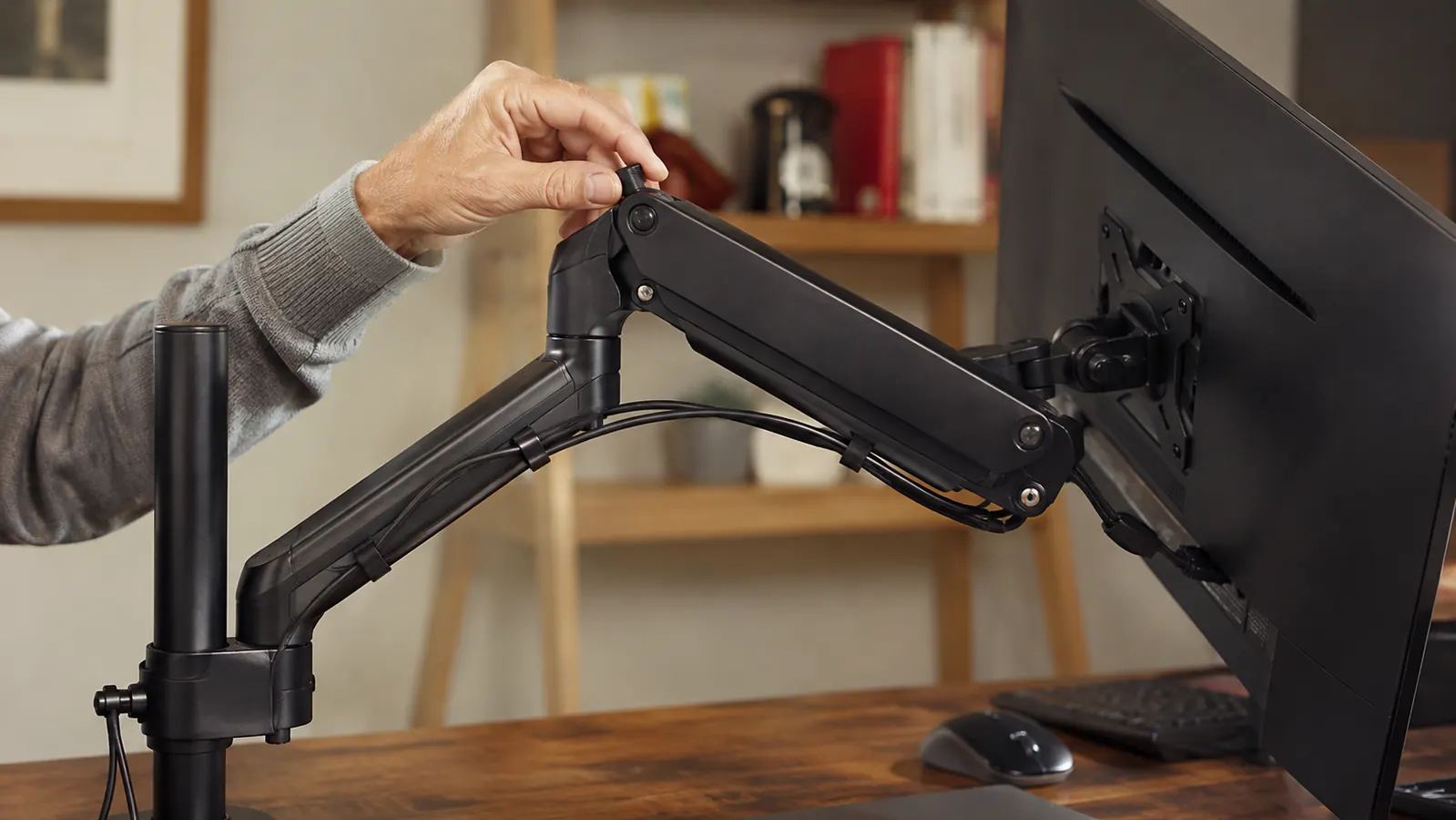
The whole point of a monitor arm is that it puts the top of your screen at or slightly below eye level, which is the actual ergonomic target most desk setups miss. A fixed stand gives you one height, whatever the box happens to be, and if that height is wrong for your desk and your chair, you're stuck adjusting your neck instead of your monitor every single day. The VIVO's gas spring lets you push the screen up, down, forward, or back with one hand and it holds wherever you leave it, no thumbscrews to loosen first. I moved mine up about two and a half inches the first week and haven't touched the height since, it just stayed put through months of daily use across a 20,295-review, 4.5-star track record that backs up my own experience.
The desk space it frees up matters more than I expected going in. Because the arm clamps to the back edge and the monitor floats above the desk, I got back the entire footprint the old stand used to occupy, which turned out to be enough room for a notebook and a coffee mug I used to balance on the corner. If you run a small desk in a bedroom or a shared space, that reclaimed depth is a real, usable amount of surface, not a marketing bullet point. The built-in cable clips were a smaller win but a nice one, my HDMI and power cables used to hang off the back of the stand in a visible tangle, now they run up through the arm and disappear before they hit the desk.
Where a Fixed Stand Wins
A fixed stand is the right call when your monitor already sits at a good height and your only complaint is wobble or clutter, not neck strain. It's cheaper, it takes five minutes to set up, and there's nothing to clamp to your desk edge, which matters if you're renting furniture you don't want to put a clamp mark on or you're working off a glass desktop that doesn't grip a clamp well. Some fixed stands also add a shelf or drawer underneath for a keyboard or notebook, which the VIVO arm doesn't do at all since it's just holding the screen in open air.
It's also the better pick if you move your setup often, say you work from a coffee shop counter twice a week or you share one desk with a roommate on alternating days. A fixed stand travels in a tote bag, sets down, and does its one job without any tools or clamp adjustment. The VIVO arm is meant to stay clamped in place, taking it on and off regularly gets old fast, and if your desk edge is thinner than about 1.6 inches or thicker than roughly 3.5 inches, the clamp won't seat properly and you'll need the grommet mount instead, which means drilling a hole through the desk. That's a real commitment a fixed stand never asks you to make.
If your monitor sits too low, no amount of chair adjusting fixes that
The VIVO arm puts your screen exactly at eye level in about 15 minutes and frees up the desk space a fixed stand takes.
Amazon Check Today's Price on Amazon →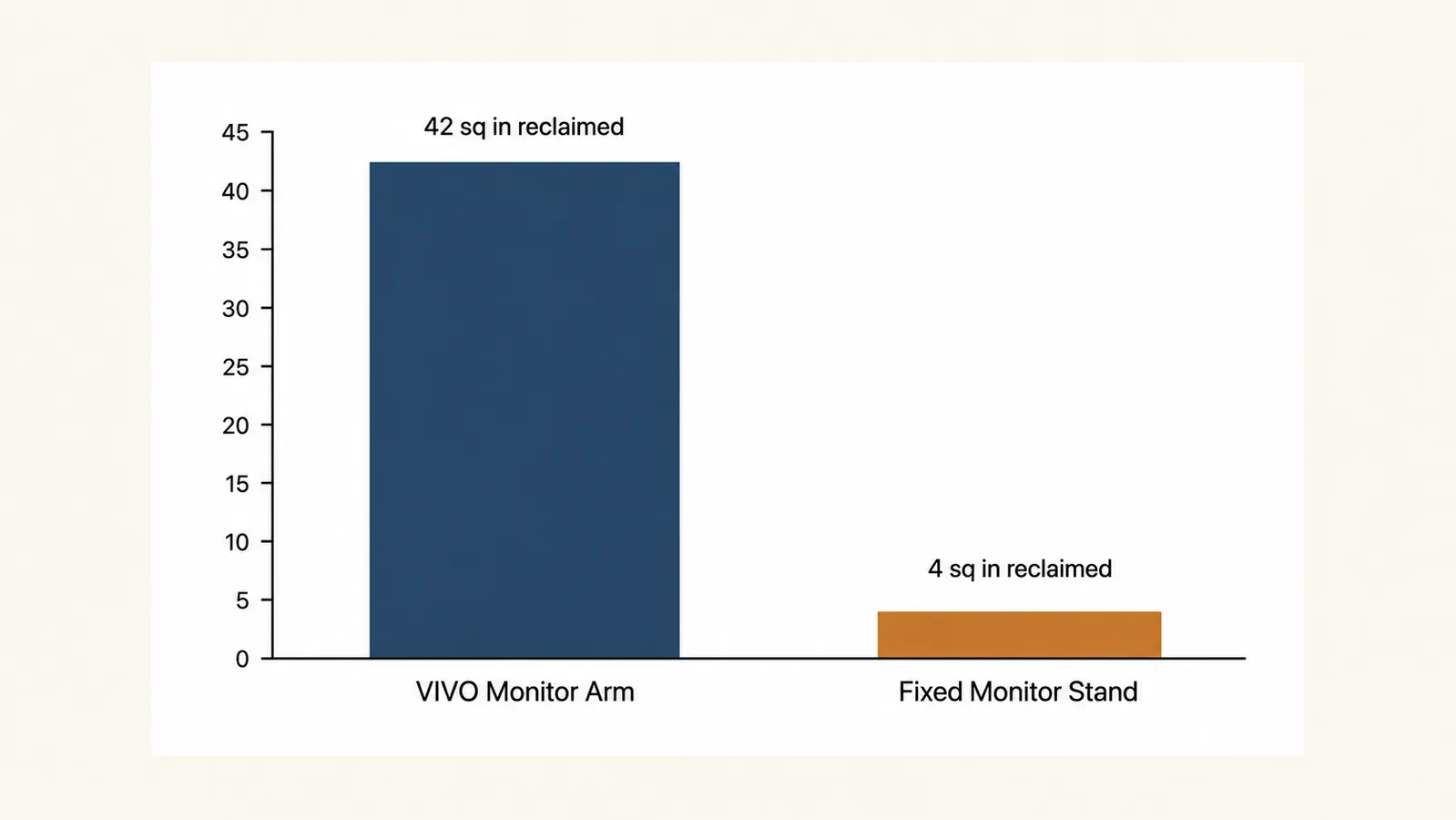
The Desk Space and Cable Reality
I underestimated how much a fixed stand's footprint bothers people until I got rid of mine. Mine was about 6 inches deep and sat right in the zone where my hands wanted to rest while typing, so I was constantly working around a plastic box that existed purely to hold the monitor up. With the arm clamped to the back edge, that whole strip of desk opened up. On the chart above I measured it out, roughly 42 square inches reclaimed once the stand's footprint and the space I used to leave clear around it were both gone, versus a fixed stand giving you back almost nothing since it just sits where the monitor used to sit anyway.
Cable routing is the other quiet upgrade. A fixed stand does nothing for your cables, they run straight off the back of the monitor and pool on the desk or hang off the edge, which is exactly what mine looked like for two years. The VIVO's arm has small plastic clips along its length that catch the HDMI, DisplayPort, and power cable and route them up through the joints, so they move with the arm instead of dragging across the desk every time you adjust the screen. It's not a dramatic feature, but it's the difference between a desk that looks tidy on a video call and one where the camera catches a cable nest every time you lean back.
I didn't need a better chair. I needed my monitor two and a half inches higher, and nobody tells you that's usually the actual fix.
The Assembly and Setup Reality
The VIVO arm ships in one box with the clamp, the grommet mount hardware, an Allen wrench, and a VESA plate that screws onto the back of your monitor. My setup took about 18 minutes, most of it spent finding the four screws that came with my monitor instead of using the longer ones VIVO includes, since not every monitor uses the same screw depth. Once the VESA plate was on, clamping the arm to the desk and hanging the monitor took under five minutes, and setting the gas-spring tension so the screen didn't drift up or down on its own took another two or three minutes of trial and error with the small tension screw on the joint.
A fixed stand is genuinely faster, you take it out of the box, set it on the desk, and place the monitor on top. No tools, no VESA mounting in most cases since a lot of fixed stands just cradle the monitor's existing base. If your priority is getting a monitor set up in the next five minutes with zero fuss and your height is already fine, that simplicity is a real advantage and not something to dismiss just because the arm does more.

What Nobody Mentions Until You've Lived With One
Here's the part the spec sheet skips. The VIVO arm needs a heavier monitor than you might expect to feel fully stable at full extension, mine is a 27 inch, roughly 12 lb panel, and it holds rock steady, but a friend tried it with a lightweight 22 inch monitor under 8 lbs and found the gas spring had a bit too much lift for that weight, requiring an extra minute of tension adjustment to stop it from creeping upward on its own. It's an easy fix with the tension screw, but it's not something you find out until you've actually mounted your specific monitor.
A fixed stand has its own quiet downside that only shows up over time, the wobble. Mine developed a slight side-to-side sway after about a year of daily typing, not dangerous, just enough that I noticed the screen shift a little every time I hit the keyboard hard. It's cheap plastic construction doing exactly what cheap plastic construction does eventually. The VIVO's metal arm and locking joints haven't developed any wobble at all in months of the same daily typing, which is the kind of thing you only appreciate once you've lived with the alternative.
Who Should Buy Which
If your monitor sits at the wrong height, if your desk space feels cramped, or if a sore neck by mid-afternoon is a real pattern for you, buy the VIVO arm. It's what most readers of Best Home Office Setup Hub end up choosing once they realize a stand can't actually fix a height problem, only an arm can. If your current setup already puts the screen at a comfortable eye level and your only complaint is a little wobble or clutter, a basic fixed stand is a perfectly reasonable, cheaper answer, and there's no reason to spend more just to get features you won't use. Figure out which problem you actually have before you buy either one, because they solve genuinely different things even though they look like the same category of product on a store shelf.
Stop tilting your chin down eight hours a day
The VIVO arm gets your monitor to actual eye level in about 15 minutes, on the desk you already have.
Amazon Check Today's Price on Amazon →