

For the better part of two years I worked with my laptop flat on the desk, screen maybe six inches above the surface, chin tucked down like I was reading a book in my lap for eight hours a day. I knew it was bad posture. I didn't know it was the actual cause of the tightness that had crept into the back of my neck until a physical therapist friend watched me type for thirty seconds on a video call and said, without me asking, "your screen is too low."
I bought the VIVO single monitor arm in February at a budget price point, mostly because it was the cheapest option that could hold a 27-inch monitor and had a real gas-spring mechanism instead of a friction joint that slips over time. At Best Home Office Setup Hub, this is one of the most common fixes we point readers toward when the complaint is neck or upper-back tightness rather than lower-back pain, which is usually a chair problem instead. I've now used this arm daily for six months, first with a 27-inch monitor and later swapping in a laptop stand for a few weeks when I traveled with a lighter setup. This is what actually happened.
The Quick Verdict
A genuinely sturdy, easy-to-clamp arm that fixed my downward neck tilt within the first week and hasn't drifted or sagged in six months of daily adjustment.
Amazon Check Today's Price →If your neck aches by 3pm, your screen is probably six inches too low
I spent two years assuming it was my chair. It wasn't. Check today's price on the VIVO monitor arm and see if it's in stock.
Amazon Check Today's Price on Amazon →How I've Used It
My desk is a 48-inch IKEA sit-stand desk against a wall with no window behind me, which matters because monitor arms with C-clamps need free edge space, and mine only has the back edge available. I run a 27-inch monitor as my main screen with a laptop closed off to the side most days, though for about three weeks in April I pulled the monitor off entirely and mounted a laptop stand tray to the same arm while my main monitor was in for a return on an unrelated product.
I'm 5'10", and I sit for roughly six to seven hours a day across two or three sessions, standing for the rest using the desk's lift function. Before the arm, my laptop sat on a cheap foam wedge that raised it maybe two inches off the desk, nowhere near eye level. The arm changed exactly one variable in my setup: where the screen sits in space. Everything else, chair, desk height, lighting, stayed the same.
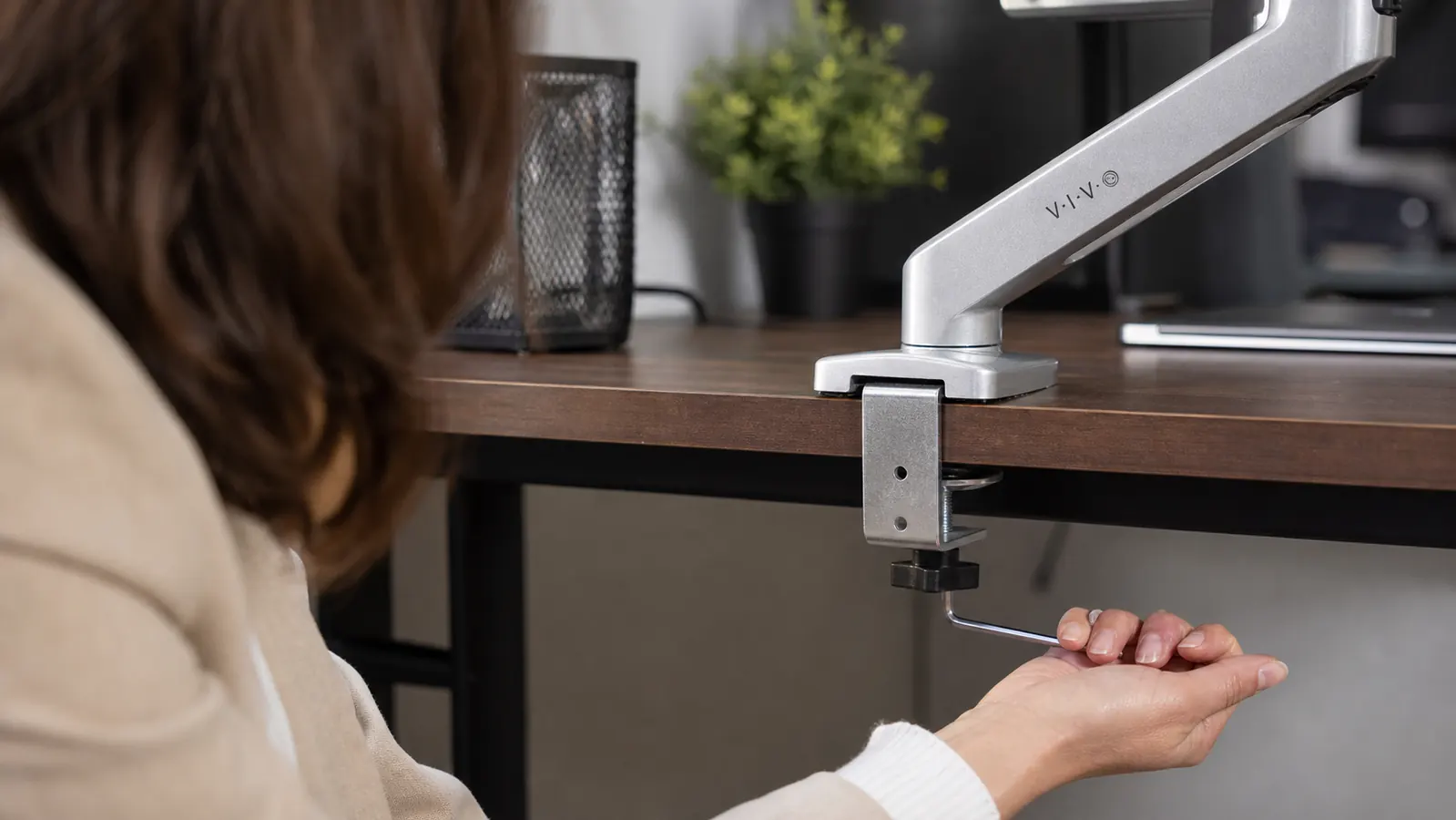
Setup took me about twenty minutes, most of it spent figuring out where on the desk edge to position the clamp so the arm's reach would actually get the screen centered above my keyboard rather than off to one side. The clamp itself tightens with a hex key VIVO includes in the box, and once I found the right spot, I marked it with a pencil so I'd know where to reclamp it after the laptop-stand detour in April.
The first week was mostly me overcorrecting. I raised the monitor higher than eye level on day one because I liked how it looked, then had to bring it back down after my chin started tilting up instead of down, which turned out to strain my upper neck just as much, only in the opposite direction. The sweet spot, for me, ended up being top of the screen at eyebrow height, roughly a thumb's width above where I'd guessed on day one.
The Gas-Spring Arm, and Whether It Actually Holds Position
The core selling point on any monitor arm in this price range is whether the gas spring holds your screen where you leave it, or slowly droops over weeks of use the way a cheap friction-joint lamp does. I was skeptical, because I'd owned a budget no-name arm years ago that sagged noticeably within two months. The VIVO arm has a visible tension adjustment screw on the vertical joint, which you turn with the included hex key to match the weight of your monitor.
My 27-inch monitor weighs close to 12 pounds, and once I dialed in the tension in the first week, I haven't touched that screw again in six months. The screen holds wherever I push it, whether that's raised for standing work, tilted down slightly for reading a document, or pulled in close when I'm annotating something in detail. I did have to retune the tension once, during the laptop-stand swap, since the stand plus laptop weighed noticeably less than the monitor and the arm wanted to float upward until I loosened the spring.
The arm has two pivot joints plus the base swivel, so the range of motion is genuinely wide. I can push the monitor almost flush against the wall when I'm not using it, or pull it out sixteen inches toward me, which I do when I'm proofreading small text. The rotation into portrait mode works too, though I only use that for reading long PDFs, not daily.
Cable Management and the Clamp Itself
VIVO includes plastic cable clips that snap onto the arm at each joint, and they do a decent job of keeping the power cord and HDMI cable from swinging loose when you move the screen. I ran the cables through all three clips on setup day and haven't had to redo it, even after months of daily height and angle adjustments. It's not a fully enclosed cable channel like some pricier arms have, so if you're picky about a completely clean look from every angle, you'll still see cable at the base where it exits toward the wall outlet.
The C-clamp base is the part I was most worried about, since I'd read a few reviews before buying that mentioned it marking softer desk surfaces. My desk is a laminate IKEA top, and after six months of the clamp sitting in one spot, there's a very faint indent where the rubber pad pressed in, visible only if you look for it under direct light. If your desk has a finish you're precious about, VIVO also includes a grommet-mount option that goes through a drilled hole instead of clamping the edge, which avoids that entirely. I used the clamp because I didn't want to drill my desk, and I'd make the same choice again.
One thing I'd tell anyone with a standing desk specifically: reclamp the arm after the first week of raising and lowering the desk. My clamp shifted maybe a quarter inch in the first ten days as the desk went up and down and the whole assembly settled, and a quick retighten with the hex key fixed it. It hasn't shifted since.
Six Months In: What's Held Up
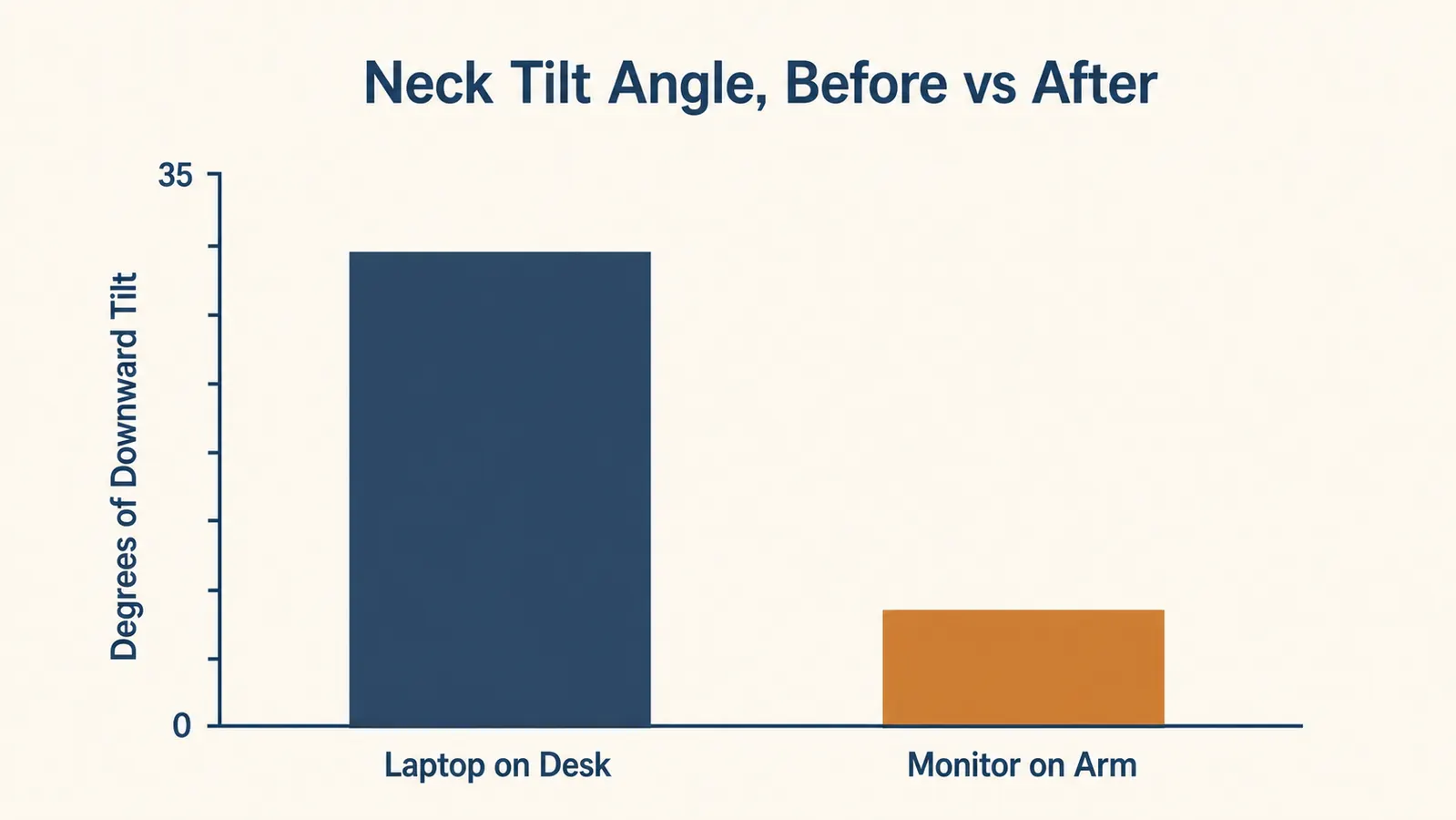
The neck tilt was the whole point of buying this, so I paid attention to it specifically. Before the arm, my laptop screen sat low enough that I was looking down at roughly a 30-degree angle for most of the day, based on a rough phone-level check my physical therapist friend walked me through. With the monitor at eye level on the arm, that dropped to somewhere around 8 degrees, basically looking straight ahead with a slight downward glance. The tightness at the back of my neck that used to show up by mid-afternoon stopped showing up within the first week and hasn't come back.
Mechanically, nothing has loosened that I can find. The base clamp is as tight as day one, I check it about once a month by giving the arm a firm push and seeing if the base shifts, and it hasn't. The joints still hold tension at the level I set in February. The only wear I can point to is cosmetic, a small scuff on the underside of the arm from where it occasionally brushes the back edge of my keyboard tray when I push the monitor all the way back.
Where It Falls Short
The included hex key is small and easy to lose, and I did lose mine for about two weeks in March before finding it wedged in a drawer, which meant I couldn't retune the tension during that stretch. A standard hex key from any toolkit works as a substitute, but VIVO doesn't print the size on the arm itself, so you'd need to measure it or just keep better track of the one in the box.
The weight range on the single arm tops out around 22 pounds according to VIVO's listing, which covers most monitors up to 32 inches but rules out heavier ultrawide displays or dual-monitor setups, since this is a single-arm mount, not a dual arm. If you're running two monitors, you'd need VIVO's dual-arm version or a separate second mount, not this one.
The instructions are diagram-only, same as most budget desk hardware I've bought, and while the clamp assembly is straightforward, the tension-adjustment step isn't obvious from the diagram alone. I ended up finding a two-minute video from a different owner online to confirm I was turning the right screw, which is a minor annoyance for something that should have been printed clearly.

What I Considered Instead
Before buying, I looked at a fixed tilt-and-swivel stand, the kind that bolts to the base of the monitor without any arm reach. It would have raised the screen, but it's a fixed height, and I move between sitting and standing throughout the day, so a stand that couldn't adjust with the desk felt like solving half the problem. I compared that option directly in a separate piece if you want the full breakdown of stand versus arm.
I also considered a premium branded arm, at the higher end, with a sleeker cable channel and a slightly smoother gas-spring feel based on a showroom test. It was nicer to operate, no argument there, but the difference was mostly in polish, not function, and I couldn't justify roughly two and a half times the price for a smoother glide when the VIVO arm was already holding position reliably.
The VIVO arm landed where I wanted: functional, sturdy, cheap enough that if it failed in year one I wouldn't be out much, and it hasn't failed.
What I Liked
- Gas-spring tension held steady for six months with zero drift or sagging
- Dropped my downward neck tilt from roughly 30 degrees to about 8 degrees within the first week
- C-clamp base still doesn't budge under a firm push after six months
- Wide range of motion, pulls in 16 inches and rotates to portrait
- Cable clips at each joint keep cords from swinging when the arm moves
- Grommet-mount option included if you don't want to clamp your desk edge
Where It Falls Short
- Included hex key is small and unlabeled, easy to misplace
- Left a faint indent in a laminate desk top after six months in one spot
- Cable routing isn't fully enclosed, some cord is visible near the base
- Single-arm design, won't work for dual-monitor setups
- Tension-adjustment step isn't well explained in the printed instructions
I didn't need a monitor arm that looked impressive on a call. I needed my neck to stop hurting by 3pm. This one did that in a week and hasn't slipped since.
Who This Is For
If you're working off a laptop propped on books or a low stand, or a monitor that's sitting flat on the desk below eye level, and you notice neck or upper-back tightness by mid-afternoon, this is a real fix, not a cosmetic upgrade. It's also a good match if you switch between sitting and standing during the day, since the arm moves with the desk instead of locking you into one fixed height. It's held up fine for my 12-pound monitor and for a lighter laptop-stand setup, so it covers most single-screen situations.
Who Should Skip It
If you're running dual monitors, you want VIVO's dual-arm version, not this one, since this is built for a single screen up to about 22 pounds. If your desk surface is something you don't want any clamp pressure on at all, even a faint mark, use the grommet-mount hole instead of the clamp, or look at a freestanding monitor stand. And if your desk edge isn't accessible for a clamp or a drilled hole, a different mounting style entirely will serve you better.
Six months of daily adjustment and this arm hasn't sagged an inch
That's the honest version of this review. If your screen is still sitting too low, see today's price on the VIVO monitor arm before your next long day of calls.
Amazon Check Today's Price on Amazon →